
Virtual games have become a popular way to connect, socialize, and have fun online. As remote work and digital communication continue to grow, these games offer an easy way to break the ice, build relationships, and encourage teamwork, no matter where people are located. From virtual trivia nights to online scavenger hunts, virtual games create engaging experiences that bring people together.
Online gaming has also transformed how we play and interact with others. Multiplayer and interactive games allow friends, families, and teams to connect in real time, encouraging collaboration, friendly competition, and laughter. In this article, we’ll explore some of the best virtual games and how they can turn any online gathering into a fun and memorable experience.
Games you can play online with groups big and small
What’s a virtual get-together without some virtual games? Whether you have a competitive side or you’re looking for some new ways to team build with colleagues or relax with friends, playing online group games is a great way to connect virtually. Unlike in-person gatherings, which can be challenging to organize for remote teams, virtual activities make it easy for everyone to participate, no matter where they are. Online group games can also be seamlessly incorporated into virtual meetings to foster engagement, break the ice, and combat meeting fatigue.
If you run a remote-first or hybrid workplace, or simply work from home and want to connect with friends, planning a game night is a great way to bond during a weeknight. For virtual teams, virtual activities are essential for keeping everyone engaged and connected. Many people have used video conferencing tools, like Zoom and Google Meet, to run their game nights. While these tools are great, there is something even better for hosting fun online games. Try using an immersive video chat platform.
What is immersive video chat? They are software products that realistically mimic the real world in a virtual environment. Many companies use them to foster connections between team members by creating virtual offices. These video chat platforms are perfect for organizing fun online games. Some, like Kumospace, even include free games built directly into the immersive video chat experience.
Free online games
Make sure that the online game you play works well for users on mobile devices. When choosing a game, it's important to consider group size, as some games are better suited for small groups while others can accommodate larger numbers. If you are playing with friends, it’s also essential to consider cost, so sticking to free online games is usually the best strategy. Below are 15 fun online games that can be played for FREE.
The Online Code Names Game
This is an online version of a very popular board game, Codenames. You can play the game directly in Kumospace; here is a how-to guide.

Codenames within Kumospace are called Word Guess. To get started, simply click the object, and the game will begin. It is an online multiplayer game where players are divided into teams. The game centers around team-based play between two designated teams, so first divide your group into two (i.e., the red team and blue team), and then choose one person on each team to be the secret agent/clue giver. Before the game starts, you can determine the first player or team to give clues by flipping a coin or using any random method. This first player sets the tone for the challenge ahead and establishes the turn order. The secret agent’s objective is to try to get their team members to correctly guess all the Codenames cards that have been displayed for them.
Essentials to the Game: Each card has a word on it (i.e., your secret code), so the players have to associate all the words on their virtual team’s cards using other words. It’s way less complex than it sounds. One of the biggest challenges of the game, however, is crafting effective one-word clues, since your clues can only be one word and can’t be proper nouns, this challenge really tests your creativity and problem-solving skills. The game naturally encourages discussion among team members as they debate possible clues and answers, fostering critical thinking and collaborative communication.
How do you win? When your team is the first to guess all the cards/words.
Online Chess
To access online chess, simply click the chessboard object within your Kumospace. Here is a supporting help article that teaches you how to play chess.

Once you have selected who you are playing, it’s game on. And for those of us who are not Chess masters, here is a Chess 101 guide.
Brief History. Modern chess has existed since the 1400s, though its origins date back to around 300 A.D. As an abstract strategy game focused on military tactics, it has become one of the world’s most enduring and popular games.
Gameplay. Each chess piece moves uniquely. Players capture opponents’ pieces while protecting their own, using strategy and quick thinking, especially in fast-paced online matches.
How Do You Win? The game ends when a player’s King cannot escape attack, a position known as checkmate.
Puzzle Game
Everyone loves a good puzzle game! If you have ever played Tetris, this is a free online version, and it’s available right within Kumospace. The puzzle game is a fun activity that brings people together for entertainment and friendly competition, making it perfect for groups or social gatherings. To access the Puzzle Game, just click on the blue video game object or the video arcade object.

The puzzle game is an online multiplayer Tetris. It was one of the most popular and fun games of the 1980s, but has remained a favorite game amongst people around the world.
How to play. Each player is trying to create a solid connected line with a set of randomly varying pieces. Each piece can be rotated, moved from side to side, and accelerated into place. Here is an animation of the gameplay.
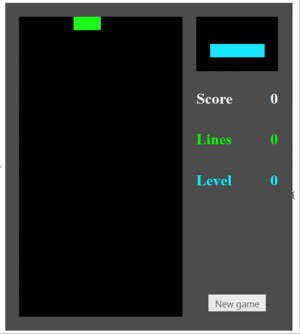
How to Win? Progress in the game is scored. When playing multiplayer, players who clear a row can give the row to other players, making their gameplay more challenging. A player loses when his or her bricks reach the top of the screen.
Virtual Trivia
Tried-and-true trivia games are some of the easiest and most fun games to play with colleagues or friends. Just like in real life, virtual trivia games are centered around your team’s general knowledge about various topics. Virtual trivia also fosters friendly competition, helping teams bond and encouraging camaraderie as participants have fun testing their knowledge. Incorporating creative trivia questions can get everyone excited and make the session more engaging. Here is a free trivia generator from the imaginative folks at Let’s Roam. They are a company that organizes physical and virtual team-building activities. Many of these activities include playing virtual games.
Their generator compiles info about you and your peers and lets you personalize your own trivia questions. This is particularly good for groups of work colleagues, friends, and family members.
Gameplay. One person in the group, often the organizer, is the moderator. This person’s job is to ask the questions and manage the team scores. Participants organize into groups. The groups don’t have to be a specific size, but if the moderator is concerned about fairness, they should have a specific team size or range for the team size. The moderator then asks a series of trivia questions, and the team writes down their answer. Each correct answer is worth one point.
Pro Tip: When playing virtually, it’s good to choose a video chat platform with either spatial audio or breakout rooms so that team members can quickly brainstorm answers to the question without the other team’s eavesdropping.
Deciding the Winning Team. The team with the most points wins.
Bingo
This is an age-old classic, great for all ages. It’s one of the best online group games to play. The classic game involves Bingo cards with numbers on them and a mechanism for randomly picking a number.
How to Play. The Bingo caller, the person organizing this fun online game, gives each player a Bingo card that contains their numbers. The caller then selects a number at random and calls it out to the group.
To play Bingo virtually, we recommend this free Bingo card website that handles much of the gameplay. As the caller, you can let the computer do the hard work for you, and you simply have to start the game and distribute the link to your colleagues, friends, or family. Some virtual Bingo platforms also allow players to join quickly by scanning a QR code with their phones, making it even easier to participate.
How to Win at Bingo. The game ends when a player successfully connects five spaces in a vertical, horizontal, or diagonal line. Setting a time limit for each round can help keep the game fast-paced and engaging.
Virtual Team Building Pro Tip: If you are looking to kick up the fun, you can create your own virtual Bingo cards. There is a website, Bingomaker, that helps you get creative. Kumospace, a remote-first company, recently organized a remote team-building event where we played virtual Bingo using custom-made cards. Some of the questions included ‘had more than one tattoo,’ ‘got kicked out of an establishment,’ ‘danced on a table,’ or other adventures that team members had done during their lives. Bonus! Ask players to share the story behind each adventure. These kinds of fun games and socialization help build a remote company culture.
Word Scatter
Calling all wordsmiths and Scrabble fanatics, this virtual game is for you. Word Scatter is similar to Boggle, but all online and free to play. The game is designed to engage players by challenging them to think creatively and quickly. The game can be played in online multiplayer or single-player mode.
Rules of the Game. The goal of Word Scatter is to find words within the scattered letters on the game board. Each word will give you points based on the letters, similar to Scrabble. If you “find” a word that isn’t listed in the game library of over 265,000 words, you receive a 10-point penalty. If a player misspells a word, they also automatically lose 10 points.
Picking the Winner. The player with the most points, meaning they found the most words worth the most points, at the end of the game, is the winner.
Skribbl
If you love to draw, then this may be the online game for you. Even if you just have fun doodling from time to time, you will enjoy this virtual game. Skribbl is a free online game that centers around drawing and guessing games. It is highly interactive, encouraging players to participate actively through real-time drawing and guessing, which fosters engagement and teamwork. It is super accessible and easy to use with Kumospace’s chat software.
Online Gameplay. This is an online multiplayer game that is one of the best online group games companies, and families can play. When it’s a player’s turn to draw, they must pick a word from the three available options. The game involves players taking turns guessing what is being drawn, which keeps everyone engaged and encourages participation. They then have 80 seconds to visualize that word.
For players who are not drawing, it is an opportunity to rack up points. When somebody else is drawing, you have to try to guess what is being drawn. The earlier you guess a word, the more points you receive.
Who wins? The player with the most points. It’s just that simple.
Jackbox
Is a game show-style activity your jam? Then you and your pals will want to give you and your Jackbox a spin. It’s one of the more popular online games that mimics a game show. Jackbox offers multiple game modes, allowing players to switch between different types of games for a varied and engaging experience. Originally designed for IRL parties where people gather ‘round a screen, Jackbox can also be played as a virtual game. One player has to buy a game (or a Jackbox Party Pack), and they can share it for free with their friends on Kumospace and even use the advanced screen-sharing feature.
How to play. When the game begins, all the players will see a four-letter room code pop up. To get started, players go to jackbox.tv on their web browser and enter the “room code” and a name, and voila, they have joined the game. During the game, players see a question and two options. They select their favorite option, or more accurately, the one they think the group will be more likely to select. Points are allocated based on the majority votes. Here is a video of Jackbox gameplay.
How to Win? The person with the most points at the end of several rounds is the winner. Good luck!
Among Us
The virtual game Among Us got mega-popular during quarantine. Among Us is considered one of the most popular games for online group play, especially during remote gatherings. Even a member of the U.S. Congress famously showcased the game on Twitch in 2020. It’s a great game to play virtually with friends or work colleagues using video conferencing software or in a virtual office.
Game Mechanics. Have everyone join us in your Kumospace and share the link for them to download the Among Us app on their mobile devices. Then create a private game for the whole group. When you enter the online game, one player will be dubbed the “imposter.” Their goal? Slyly killing off their fellow crewmates one by one. The surviving crew members meet up after each death to hash out theories about the imposter, and then they vote for who they think the imposter is. Working closely with your teammates is essential for building trust and successfully identifying the imposter. This is an online group game that can be played by 4 to 10 people. It’s great to connect with pals and do remote team building.
End of the Game. The game ends when the imposter is discovered or the crew all dies.
The Hat Game
This game is for word-guessing lovers! The host needs to do some prep work before the serious fun begins. You also want to prepare the words that go in The Hat, hence the game’s name! We recommend using the Random Word Generator. You should choose the number of words you want; 5-10 nouns per participant is ideal for this virtual game. Write them down on small pieces of paper and put them in a hat.
The game can be played with most video conferencing software. Here are some helpful instructions for playing specifically inside Kumospace.
- Access the Edit menu by clicking on the chair icon in the upper right corner or pressing the ‘E’ button on your keyboard.
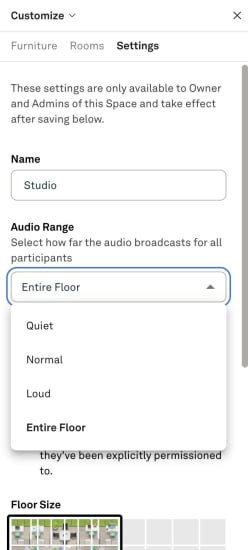
- Choose the Settings tab on the right and scroll down to Audio Range.
Change the audio range in your Kumospace to Entire Floor.
- Make all the players members of your space.
- Keep an eye on the timer and write down the score for each of the three rounds.
How to Play this Virtual Game. This is a free online game where the players split up into pairs, and alternate who describes and who guesses the words. Within Kumospace, pairs should sit near one another within the virtual space. The host draws one word at a time and sends it in Private Chat to the person whose turn it is to describe the word to their partner. When they guess a word, send them the next word per private chat. They have 60 seconds to guess as many words as possible. When their time is up, it’s the next pair’s turn. The host keeps the scores.
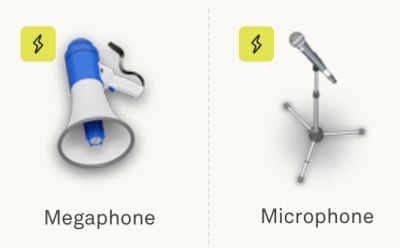
Once all the words have been used, the host puts them back in the hat, and so begins round 2 - charades. This time players need to act out the word to their partner without using a sound. For most amusement, players doing the charade should use the Kumospace Broadcast feature so that everyone can see them.
At the end of the second round, the words go back in the hat, and the final round begins - have your partner guess the word by just saying one word associated with it, e.g. if the word is a lamp, you might say lightbulb.
End of the game. The winners are the partners with the highest score, representing the most correct guesses!
Virtual games made specifically for group video chat
Here is a list of purpose-built games to be played exclusively within Kumospace, an immersive video chat platform. Many of these games are enhanced by having a live host to moderate, explain rules, and keep the game running smoothly, ensuring real-time interaction and engagement. Some online group games also involve creating or delivering a short presentation, which can help build communication and public speaking skills. If you are organizing a virtual get-together and looking for fun games to play, then Kumospace will be your best option. It’s free to use; just create an account.
Spies & Assassins
A fun spy game that is perfect for playing with co-workers or friends online. Spies & Assassins takes place in a virtual space and involves team strategy play. It’s one of the most fun games to play online, especially for large groups. This multiplayer game can be played by up to 100 people. The game was specifically developed to be played within Kumospace.
How to Play. The organizer assigned people to specific teams and roles within the Kumospace. Players then move around the space and once they get close to one another, try to discover if they are opposing team members, or friendly spies, via a special code word. If a player bumps into the roaming assassin during their journey, then they “die” and have to stay where they “fell” within the Kumospace. Many thanks to a city government official in Canada who actually created an entire playbook for playing Spies & Assassins.
Winning. Either the Spy Crew completes its mission of finding all its team members, or the Assassin successfully eliminates all players. Spies & Assassins is also a great way to build trust among team members as they collaborate and rely on each other to achieve their objectives.
Rock the Basket
The virtual ice-breaker game is built into Kumospace’s video chat product. It’s perfect for virtual team bonding and introducing strangers. Here is a video walkthrough of how to set the game up and play.
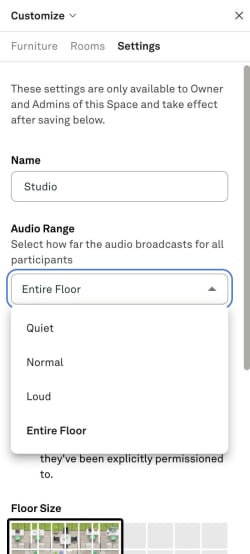
The Game Mechanics. Start by counting the number of players, then add one less chair than there are players to your Kumospace. This can be done by clicking on the chair icon in the upper right corner or pressing the ‘E’ button on your keyboard to open your Edit tab. Then add or remove chairs as needed. Change the audio settings to the Entire floor, and the game can begin.
Everybody should take a seat, except the host, who can start the game off by doing the first “call out”. A call-out can be any statement that refers to the players’ lives, personality, achievements, attire, or anything a person can identify with. The game encourages players to talk and share fun facts about themselves, fostering a relaxed and friendly atmosphere. For example, they can call out: “Everybody wearing white socks, rock the basket.” When the call-out is made, everyone who is wearing white socks, and the person who made the call-out, needs to get up from their chair and quickly find a new seat.
The slowest player will be left without a chair, which makes them the new caller!
How Does Someone Win? There isn’t any winning or losing in this game. It’s about having fun with friends, family, and co-workers. Rock the Basket is great fun for breaking the ice and getting everyone involved. If everyone enjoyed themselves, then it is a win!
Bang Bang!
This action-packed game is excellent for those who love a good mystery. The object of this virtual game is to find the killer. The game is specifically built for Kumospace and is an entirely free game to play online. A complete guide to Bang Bang, a Kumospace game.
Playing this Online Group Game. Start by changing your audio settings to Quiet and promoting all players to members. Here is an easy Kumospace hosting guide and a changing user roles guide.
The game begins when the host sends a secret chat to one player at random, telling them that they are the killer. Since the host knows the killer, they must sit out the first round. But don’t worry, the host gets to play in future rounds.
The killer will move around the floor, and when the opportune moment arises, they need to get close to someone, making sure that nobody else can hear them, and say: “Bang bang, you’re dead!”
If you’ve been killed, you need to slowly and indirectly move towards “the morgue,” which is the coffin square in the center of the floor. The killer continues killing the victims.
Each round continues until the time runs out or the killer is discovered.

Winning the game. If you suspect who the killer is and you are still alive, you can use the Broadcast feature at any time and accuse the suspect of being the killer.
If you are mistaken, you’ll be dead, and you need to go to the morgue. If you are correct, the game starts over. The old killer sits out the next round, but not before sending a secret chat to the new killer.
Sidewalk Tag
Sidewalk Tag is a classic game with a virtual twist! We all played a version of “Tag” when we were kids. It's probably one of the favorite games played in school. So you may recall the rules. The version created within Kumospace has an added rule that you must stay on the virtual sidewalks. Here is a complete overview of this Kumospace game.
Rules of the Game & How to Play. The host should change the audio settings to Entire Floor so that all the players can hear everything. Talking and laughing with one another are more of the best parts of this virtual game. The host can then start the game by designating the first “It” person, who will start chasing the other players around the floor, all within the confines of the sidewalks, of course.

If you leave the sidewalk to escape getting caught, you're “It”! But if the “It” person leaves the sidewalk to try to catch somebody, it does not count, and they are still the “It”. If you catch someone, you must shout: “[their name] is it!”
Who Wins? Everyone, lol. There is really no winning or losing in this game. It's more about just playing a fun game with great people.
Alphabet Acrobatics
This is another virtual game that is exclusively available within Kumospace. It’s a fun online game that will for sure get everybody moving! It’s best when played with at least 8-10 people. If you have 16 or more participants, you can choose to split into two teams and compete against each other to see who can finish first. Here is a helpful overview video.
How to Play this Group Game. The game's object is to make the shape of the letter using your video avatars. A template space playing this free game is available directly within Kumospace. The host needs to change the audio settings to Entire Floor.
Pro Tip. Use the Map as it makes it easier to move around and get a better overview of your letter formations.
The host starts the game off by shouting out a letter at random. Here is a handy random number generator. The rest of the players need to try to get in a formation of that letter as quickly as possible in the middle of the floor. The last person to join the formation will have to shout out the next letter.
Winning. This game is about team building and collaboration. There is no winning, just a lot of fun.
Playing games online with Kumospace
Kumospace is a video chat application that works on the web and mobile devices. Millions of people around the world have used Kumospace. It's safe and secure with enterprise security. Notable customers include Google, AT&T, NASA, Amazon, Nike, Capital One, LinkedIn, Pfizer, Sony, and Wikipedia.
The product is uniquely suited to accel for those looking to host a virtual event or those looking to facilitate better communication and collaboration between hybrid and remote team members with a virtual office.
But Kumospace isn’t just about getting business done. It is about having fun, and therefore one of the most popular activities within Kumospace is playing virtual games. Here is how to play online games within Kumospace, broken down by the two most popular use cases.
Online group games for virtual office software
Kumospace’s primary uses are related to business. For many remote and hybrid companies use the product as a virtual office. What’s a virtual office? It’s a technology product that allows remote, hybrid, or distributed teams to foster collaboration, connection, and company culture.
A huge component of this is team building. Fun online games are one of the best ways to build positive company culture.
Fun online games for virtual events
The second most popular use case for Kumospace is organizing and hosting engaging virtual events. These events range from virtual family get-togethers to large corporate conferences. The reason event organizers choose Kumospace is because of its immersive nature. It makes attending fun!
“Doing something a little bit different really helps people's ability to explore and play” Bart Merrick, National Oceanic and Atmospheric Administration.
Whether you're organizing a governmental conference like Bart, or just getting some friends together, playing virtual games can be a great way to connect people.
In need of more virtual fun ideas?
Learn how to host a fun virtual party for your friends, family, or work colleagues. Hosting virtual parties is a great way to stay connected to friends and remote team members. Its especially important if you are running a remote or hybrid company to invest in virtual team bolding activities. Here are 23 virtual office party ideas to make a virtual night to remember.
Hosting an online game FAQs
Favorite games to be played online included Codenames, online Chess, puzzle games, and Virtual Trivia. Other popular games are Jackbox and Bingo.
Picking a suitable game is key to organizing a fun online game for large groups. Some classic group games are Bingo and trivia, which can be played with hundreds of people. Other fun virtual games are Kumospace’s Spies & Assassins, Rock the Basket, and Bang Bang. These games can be played by groups from 10 to 100.
Planning a virtual game night may feel overwhelming, but it’s actually pretty simple. Start by choosing your video conferencing platform. Kumospace is a great option. Its immersive, interactive environment makes online virtual games more engaging and fun. Then, just pick a few virtual games or virtual office game ideas your group will enjoy, and you’re ready to go!
Team bonding is critical to building positive company culture, especially for hybrid and remote companies. If you manage a hybrid or remote team, some fun socializing games to play virtually are trivia and Bingo. If you are looking for something more unique, then try (for free) Kumospace’s Rock the Basket, Bang Bang, and Spies & Assassins.





