A virtual escape room works for a remote team when the game fits in one meeting and everyone can contribute. Browser-based games suit about 4 to 8 people, Google Docs mysteries work best at 3 to 6, and groups above 30 need duplicate copies across breakout rooms or a live-hosted vendor that can scale into the hundreds. Seven formats cover most of what remote teams actually run, and the choice between them comes down to four things: headcount, time available, budget, and how much facilitation you're willing to do yourself.
Key Takeaways
- Match the format to your headcount: browser-based games work well for 4 to 8 people, while Google Docs mysteries are better suited to teams of 3 to 6. Larger groups need duplicate games across breakout rooms or a hosted vendor that handles the logistics.
- Escape rooms lose people for two main reasons: puzzles that are hard to explain over video, and a session that runs past its calendar slot. Keep the rules short and the timebox tight, and cut content rather than letting either one slide.
- When your team is tired or overloaded, make attendance optional and lean toward a lighter, story-driven format where cameras are optional and quieter people can contribute through chat.
How to pick virtual escape rooms for remote teams

Decide how long people can realistically spend, then filter to formats that fit roughly a 40- to 70-minute window, including explanation and debrief. Success depends heavily on communication and collaboration, so pick a group size where everyone actually gets to talk rather than watch.
Match the format to your headcount rather than assuming bigger always means a vendor: in the cross-team tournament setup below, 20 to 80 participants split into teams of 4 to 6, so a hosted vendor is most useful when you want to offload facilitation. Set a firm budget up front, whether that's a free option, a low-cost printable kit, or per-person hosted pricing, and check time zones and tech limits so you know if everyone can join on video or if you need something that works in a plain browser with a stable connection.
Be honest about how much facilitation you can provide. If you can't actively host, pick something either self-paced and simple, or fully run by an external host.
Best virtual escape room games and formats at a glance
|
Activity |
Best group size |
Time needed |
Cost |
Prep required |
|
Browser-based mystery escape |
4 to 8 players |
45 to 60 min |
Free to about $20 per team |
Test the link, pick a screen-sharer |
|
Google Docs detective case |
3 to 6 per team |
45 to 60 min |
Free |
Copy template, set sharing permissions |
|
Hosted virtual escape room with live game guide |
6 to 10 per room |
60 min |
Priced per room or per person |
Choose theme, confirm headcount, book date |
|
Asynchronous week-long puzzle trail |
3 to 5 per subteam, any total |
5 to 10 min per day for 5 to 7 days |
Free |
Create daily puzzles, set up submission form |
|
Hybrid scavenger-hunt escape room |
8 to 30 |
45 to 60 min |
Free to low |
Set up virtual rooms, plant clues |
|
Minimal-prep riddle and lockbox session |
3 to 12 |
40 to 50 min |
Free |
Build a short slide deck with riddles |
|
Cross-team tournament |
20 to 80, teams of 4 to 6 |
60 min |
Free to low per team |
Prepare identical game copies, leaderboard |
Browser-based mystery escape: best for 4- to 8-person teams
A browser-based escape room drops your whole team into a story-driven web page where you solve puzzles collaboratively within a set time limit. Everyone shares a link, reads the scenario together, then works through a sequence of logic and pattern puzzles using a shared digital inventory.
This suits smaller teams of about 4 to 8 people, especially cross-functional groups who already meet on Zoom or Teams and want a lightweight event. Some public libraries offer free digital escape rooms, including family-friendly games like Cinderella Escapes and Escape from Wonderland. Before using one for a remote team event, check that the puzzles suit adult participants and test every link.
To run it:
- Pick a free or low-cost browser game.
- Schedule a 60-minute call to give yourself a buffer.
- Share the link in chat.
- Nominate a screen-sharer and a timekeeper.
- Use voice and chat together to try to escape inside the 45-minute target.
The main limitation is that above 8 to 10 people on the same set of puzzles, the game gets chaotic: too many voices and not enough puzzle surface area. For larger groups, split into smaller teams with separate copies instead.
Google Docs detective case: a free online escape room for teams of 3 to 6
In this format, clues are spread across documents, sheets, or forms, and the mission is to solve a workplace-friendly mystery in 45 to 60 minutes by deciphering clues hidden in tabs and cracking a final code. It's ideal when you have a strict budget, work in teams of 3 to 6 people, and are comfortable sharing links inside your existing chat platform.
To run it:
- Copy a public Google escape room template.
- Change the names and details to fit your team.
- Set sharing permissions.
- Drop the document links into breakout rooms during the call and let each team work independently.
Include simple written rules at the top of the main document (time limit, hint policy, how to submit the final answer) so you don't have to repeat instructions in every room.
The main drawback is that formatting can get clunky. If people aren't used to Google Workspace, they can lose time navigating tabs and comments instead of focusing on the puzzles, and that friction is worse on mobile.
Hosted virtual escape room with live game guide

In a commercially hosted escape room, a live host guides the session and provides hints as needed. The game master streams a physical or digital escape room over video call, and your team directs them to search, click, and solve puzzles remotely, which often ends up feeling more like being together in person than a typical video call does.
Vendors that run parallel rooms can take a large group at once.
- Escape Experience runs up to nine rooms simultaneously at up to 10 players each. It lists $100 to $250 per session, with $250 covering a full room of up to 10 players
- The Escape Game says Remote Adventures can support events of up to 500 players. It lists $30 to $35 per player
- Beat the Lock advertises simultaneous rooms for 13 to 100+ players and lists $25 per person for a single room of 4 to 12
To run it:
- Pick a vendor and theme.
- Book a date and time.
- Share the join link.
- Let the host split players into breakout rooms if needed.
- Let the game guide keep time and explain the rules.
Prep on your end mostly means choosing the theme and collecting headcount and time zones ahead of the session. The tradeoff is that per-person pricing adds up fast at scale, and you get less say over puzzle content and pacing than with a self-run format.
Asynchronous week-long puzzle trail for distributed time zones
This format sends one short puzzle per day for a week, with a meta-puzzle at the end that uses all the answers to unlock a final code, and it's the most time-zone-friendly option here since nobody has to wake up early or stay late for it.
This suits remote teams spread across many time zones, with small subteams of 3 to 5 solving together on their own schedule.
To run it:
- Create 5 to 7 small puzzles in Google Forms, image files, or wiki pages.
- Assign each to a specific weekday.
- Have teams submit answers in a shared spreadsheet.
- Send a clear kickoff post covering dates, hint rules, and team formation.
- Announce the winning team on the final day.
A 2023 Drexel University dissertation on an asynchronous digital escape room found positive participant ratings across four measures of intrinsic motivation, although the small sample did not establish that the format significantly increased motivation compared with another approach.
The limitation is that participation drags if puzzles run too long or nobody prompts people midweek. Daily puzzles should take 5 to 10 minutes at most, and without a daily nudge from the organizer, this format quietly dies by Wednesday.
Hybrid scavenger-hunt escape room using your virtual office
This format blends a scavenger hunt with an escape room: teams move between different virtual spaces or breakout rooms collecting digital clues, screenshots, or codes to solve a final lock, so each space unlocks the next set of evidence rather than everyone seeing everything at once.
It works well on any platform that supports separate, navigable rooms, whether that's a spatial virtual office or manual Zoom breakout rooms standing in for locations like "lab," "archives," or "control room." Setup: create 4 to 6 virtual locations, plant one or two puzzles or data pieces in each, and give teams a shared worksheet or online whiteboard to track findings. Run the game in 45 to 60 minutes: a quick story intro, staggered starting points across rooms, free movement after 10 minutes, then a regroup for the reveal.
The limitation is that navigation between spaces can confuse people who are new to whatever tool you're using. Budget five minutes up front to show people how to move around and where to ask for help, or you'll lose the first round to tech confusion rather than puzzle difficulty.
Running the scavenger hunt in Kumospace
The hybrid scavenger-hunt format above works in manual Zoom breakout rooms, but reassigning people between "lab," "archives," and "control room" by hand is exactly the kind of coordination overhead that makes an organizer dread running it twice.
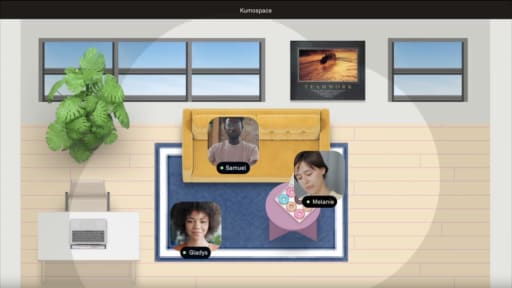
Kumospace is a persistent virtual office where each themed location can be its own room on the floor plan, letting players walk their avatars between spaces instead of waiting for a host to reassign breakout rooms. Spatial audio means a team clustered in "archives" can hear one another without the host muting the rest of the space. That removes one layer of manual reassignment from a format that already asks a lot of the organizer, and latecomers or players who want to compare notes can join another room on their own.
This is worth setting up specifically for the scavenger-hunt format above, or for any team that already runs its daily work out of a spatial office and wants the escape room to feel like an extension of a space people already know, rather than a one-off Zoom event. For the other formats in this guide, including browser games, hosted vendor sessions, and asynchronous puzzle trails, a spatial virtual office usually isn't necessary.
Minimal-prep riddle and lockbox session
This is a simple activity built around a sequence of riddles, images, and numeric "locks" displayed through screen sharing. No external software, no special tools, no vendor: the team receives each puzzle one at a time and calls out answers together.
This works best for smaller groups of 3 to 12 on a single call, particularly when you have almost no time to prepare and can't rely on everyone using the same browser or device. Build a short deck with 8 to 10 puzzles, set a 40- to 50-minute timer, read a light story hook, then flip through each puzzle while the team works together to guess codes. Tally how many locks they open before time runs out, and keep a couple of optional "bonus locks" in reserve in case the team moves faster than expected.
The main downside is that only the host controls the visuals, which can leave some participants in a passive role. Deliberately ask quieter people for specific ideas, or assign rotating "answer caller" roles to keep everyone involved.
Cross-team virtual escape room tournament for 20 to 80 players
This is a competitive format where several smaller teams each complete the same escape room in separate breakout rooms while you track finish times on a shared leaderboard, which adds friendly competition on top of the puzzles themselves.
This suits larger departments with 20 to 80 participants, especially when you want cross-functional mixing and a clear winner. Aronson, Ikuma and Nahmens (2025), writing in the International Journal of Industrial Ergonomics, tested 17 multicultural teams on a desktop virtual escape room and found it a valid, reliable measure of team performance and cohesion. Their teams were being studied as a proxy for long-term physically isolated deployments, so the finding supports that specific assessment use case rather than establishing virtual escape rooms as a general assessment tool for ordinary remote teams.
Steps: pre-assign balanced teams, prepare identical game copies, build a simple leaderboard slide, and appoint one facilitator to float between breakout rooms, handling rules questions. Run a 60-minute block: 5 minutes for rules, 45 minutes of gameplay, 10 minutes for wrap-up sharing final times. The limitation is that this needs at least one confident facilitator who can manage breakout rooms under time pressure, and some teams focus more on speed than inclusive participation, which can sideline quieter members.
What makes virtual escape room events fail

Long rule explanations at the start lose people fast. People land in a room with no idea what to do, and by the time someone figures it out, the energy is gone. Send a one-page quick-start summary before the event, and do a 90-second live walkthrough before anyone gets split up.
Puzzles that depend on tiny visual details or poor mobile layouts frustrate people fast. Test your game on phones and tablets, or explicitly require laptops. The format falls apart when half the team can't read the clue.
Overstuffing a single room with more than 8 to 10 people turns most of them into spectators. Use breakout rooms and duplicate games for large groups instead of cramming everyone into one puzzle set.
Forcing attendance when people are overloaded turns it into an obligation. Make it optional, offer multiple time slots, or state clearly that cameras are optional.
Skipping a host or timekeeper causes the game to drift. Even in self-led formats, appoint someone to watch the clock, keep the group on the same puzzle, and prompt quieter voices. Leave 5 minutes at the end for a debrief instead of running the puzzles right up to the hour.
Virtual escape room ideas for remote teams: summary
There's no universally best virtual escape room, only the one sized correctly to your group, your time slot, and how much facilitation you're willing to provide. Teams of 4 to 8 do well with a free browser game, and teams of 3 to 6 with a Google Docs mystery. Large groups need duplicate copies across breakout rooms or a hosted vendor. If you've got almost no time to prepare, a screen-shared riddle and lockbox deck runs on a single call with no extra tools. Teams spread across time zones do better with an asynchronous puzzle trail than with any live session. Quieter or camera-shy teams do better with a clue-based format like the Google Docs mystery than with a fast-paced tournament. The two failure points to guard against are unclear instructions and a session that runs long. Solve both before you pick a theme.
Frequently asked questions
A practical target is 45 to 60 minutes for gameplay, plus 5 to 10 minutes for joining and rules and another 5 to 10 minutes for a short debrief. Many hosted virtual escape rooms use a 60-minute gameplay window, while the synchronous formats in this guide range from roughly 40 to 70 minutes.
It depends on the format, but 4 to 8 players is a practical range for many of the small-team options here. Hosted rooms in this guide are planned around 6 to 10 players, while the cross-team tournament uses teams of 4 to 6. For large groups, split participants into small teams in breakout rooms and give each room its own copy of the game.
Make the event clearly optional, allow people to keep cameras off, and give roles that suit different comfort levels: note-taker, code typer, or timer. Sharing a recording or a quick summary afterward lets non-participants see the outcome without any pressure to join.
If your team is spread across multiple time zones, run either two shorter sessions that cover different time blocks or an asynchronous puzzle trail where people can contribute within a 24-hour window. Avoid start times that fall outside local working hours for any major region.
There isn't a universal ideal cadence. Quarterly is a reasonable starting point if you want a complex virtual escape room to stay occasional, with extra sessions tied to major project milestones or holidays. If you run team-building activities more often, use shorter puzzle games between larger events so the full escape-room format does not become routine.